Data Contract CLI

Test Workflow PyPI Version Stars Slack Status

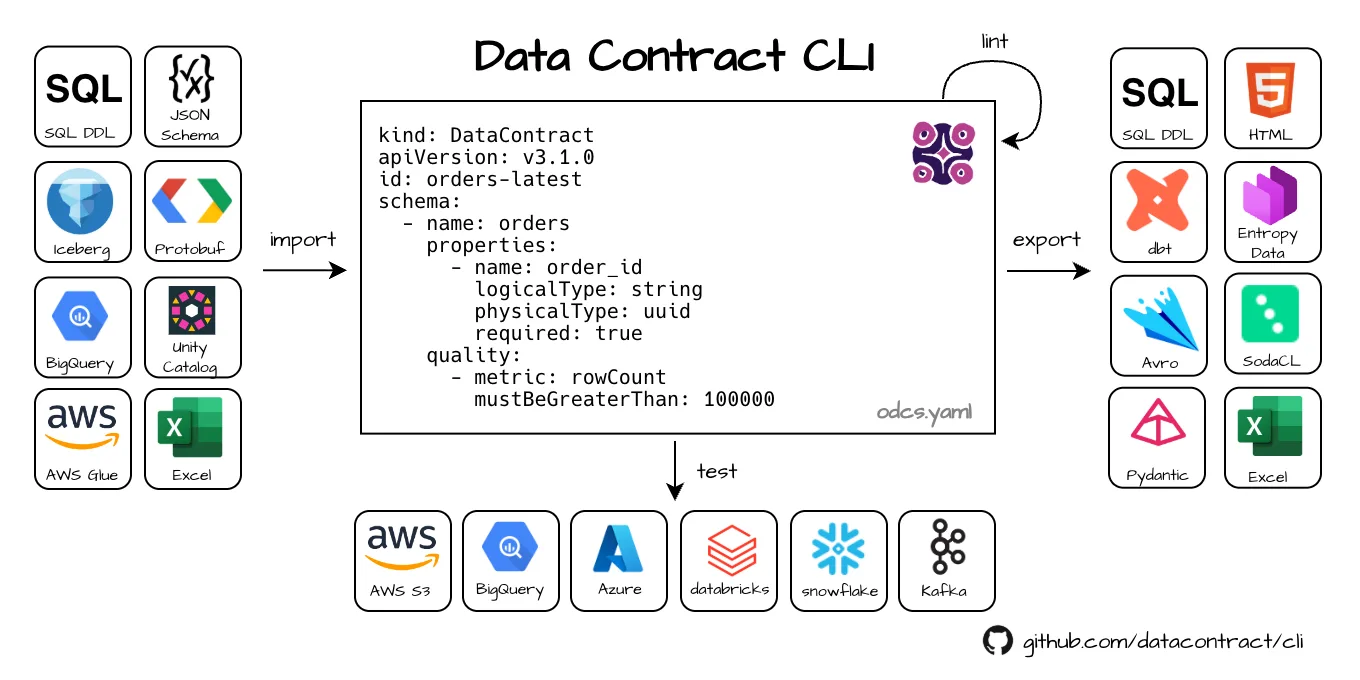
The datacontract CLI is an open-source command-line tool for working with data contracts. It natively supports the Open Data Contract Standard to lint data contracts, connect to data sources and execute schema and quality tests, and export to different formats. The tool is written in Python. It can be used as a standalone CLI tool, in a CI/CD pipeline, or directly as a Python library.

Main features of the Data Contract CLI

Quick navigation: Documentation · Best Practices · Custom Export and Import · Development Setup

Getting started

Let’s look at this data contract: https://datacontract.com/orders-v1.odcs.yaml

We have a servers section with endpoint details to a Postgres database, schema for the structure and semantics of the data, service levels and quality attributes that describe the expected freshness and number of rows.

This data contract contains all information to connect to the database and check that the actual data meets the defined schema specification and quality expectations. We can use this information to test if the actual data product is compliant to the data contract.

Let’s use uv to install the CLI (or use the Docker image),

$ uv tool install --python python3.11 --upgrade 'datacontract-cli[all]'

Now, let’s run the tests:

$ export DATACONTRACT_POSTGRES_USERNAME=datacontract_cli.egzhawjonpfweuutedfy
$ export DATACONTRACT_POSTGRES_PASSWORD=jio10JuQfDfl9JCCPdaCCpuZ1YO
$ datacontract test https://datacontract.com/orders-v1.odcs.yaml

# returns:
Testing https://datacontract.com/orders-v1.odcs.yaml
Server: production (type=postgres, host=aws-1-eu-central-2.pooler.supabase.com, port=6543, database=postgres, schema=dp_orders_v1)
╭────────┬──────────────────────────────────────────────────────────┬─────────────────────────┬─────────╮
│ Result │ Check                                                    │ Field                   │ Details │
├────────┼──────────────────────────────────────────────────────────┼─────────────────────────┼─────────┤
│ passed │ Check that field 'line_item_id' is present               │ line_items.line_item_id │         │
│ passed │ Check that field line_item_id has type UUID              │ line_items.line_item_id │         │
│ passed │ Check that field line_item_id has no missing values      │ line_items.line_item_id │         │
│ passed │ Check that field 'order_id' is present                   │ line_items.order_id     │         │
│ passed │ Check that field order_id has type UUID                  │ line_items.order_id     │         │
│ passed │ Check that field 'price' is present                      │ line_items.price        │         │
│ passed │ Check that field price has type INTEGER                  │ line_items.price        │         │
│ passed │ Check that field price has no missing values             │ line_items.price        │         │
│ passed │ Check that field 'sku' is present                        │ line_items.sku          │         │
│ passed │ Check that field sku has type TEXT                       │ line_items.sku          │         │
│ passed │ Check that field sku has no missing values               │ line_items.sku          │         │
│ passed │ Check that field 'customer_id' is present                │ orders.customer_id      │         │
│ passed │ Check that field customer_id has type TEXT               │ orders.customer_id      │         │
│ passed │ Check that field customer_id has no missing values       │ orders.customer_id      │         │
│ passed │ Check that field 'order_id' is present                   │ orders.order_id         │         │
│ passed │ Check that field order_id has type UUID                  │ orders.order_id         │         │
│ passed │ Check that field order_id has no missing values          │ orders.order_id         │         │
│ passed │ Check that unique field order_id has no duplicate values │ orders.order_id         │         │
│ passed │ Check that field 'order_status' is present               │ orders.order_status     │         │
│ passed │ Check that field order_status has type TEXT              │ orders.order_status     │         │
│ passed │ Check that field 'order_timestamp' is present            │ orders.order_timestamp  │         │
│ passed │ Check that field order_timestamp has type TIMESTAMPTZ    │ orders.order_timestamp  │         │
│ passed │ Check that field 'order_total' is present                │ orders.order_total      │         │
│ passed │ Check that field order_total has type INTEGER            │ orders.order_total      │         │
│ passed │ Check that field order_total has no missing values       │ orders.order_total      │         │
╰────────┴──────────────────────────────────────────────────────────┴─────────────────────────┴─────────╯
🟢 data contract is valid. Run 25 checks. Took 3.938887 seconds.

Voilà, the CLI tested that the YAML itself is valid, all records comply with the schema, and all quality attributes are met.

We can also use the data contract metadata to export in many formats, e.g., to generate a SQL DDL:

$ datacontract export --format sql https://datacontract.com/orders-v1.odcs.yaml

# returns:
-- Data Contract: orders
-- SQL Dialect: postgres
CREATE TABLE orders (
  order_id None not null primary key,
  customer_id text not null,
  order_total integer not null,
  order_timestamp None,
  order_status text
);
CREATE TABLE line_items (
  line_item_id None not null primary key,
  sku text not null,
  price integer not null,
  order_id None
);

Or generate an HTML export:

$ datacontract export --format html --output orders-v1.odcs.html https://datacontract.com/orders-v1.odcs.yaml

Usage

# create a new data contract from example and write it to odcs.yaml
$ datacontract init odcs.yaml

# lint the odcs.yaml
$ datacontract lint odcs.yaml

# show a changelog between two data contracts
$ datacontract changelog v1.odcs.yaml v2.odcs.yaml

# execute schema and quality checks (define credentials as environment variables)
$ datacontract test odcs.yaml

# export data contract as html (other formats: avro, dbt, dbt-sources, dbt-staging-sql, jsonschema, odcs, rdf, sql, sodacl, terraform, ...)
$ datacontract export --format html datacontract.yaml --output odcs.html

# import sql (other formats: avro, glue, bigquery, jsonschema, excel ...)
$ datacontract import --format sql --source my-ddl.sql --dialect postgres --output odcs.yaml

# import from Excel template
$ datacontract import --format excel --source odcs.xlsx --output odcs.yaml

# export to Excel template  
$ datacontract export --format excel --output odcs.xlsx odcs.yaml

Programmatic (Python)

from datacontract.data_contract import DataContract

data_contract = DataContract(data_contract_file="odcs.yaml")
run = data_contract.test()
if not run.has_passed():
    print("Data quality validation failed.")
    # Abort pipeline, alert, or take corrective actions...

How to

Installation

Choose the most appropriate installation method for your needs:

uv

The preferred way to install is uv:

uv tool install --python python3.11 --upgrade 'datacontract-cli[all]'

uvx

If you have uv installed, you can run datacontract-cli directly without installing:

uv run --with 'datacontract-cli[all]' datacontract --version

pip

Python 3.10, 3.11, and 3.12 are supported. We recommend using Python 3.11.

python3 -m pip install 'datacontract-cli[all]'
datacontract --version

pip with venv

Typically it is better to install the application in a virtual environment for your projects:

cd my-project
python3.11 -m venv venv
source venv/bin/activate
pip install 'datacontract-cli[all]'
datacontract --version

pipx

pipx installs into an isolated environment.

pipx install 'datacontract-cli[all]'
datacontract --version

Docker

You can also use our Docker image to run the CLI tool. It is also convenient for CI/CD pipelines.

docker pull datacontract/cli
docker run --rm -v ${PWD}:/home/datacontract datacontract/cli

You can create an alias for the Docker command to make it easier to use:

alias datacontract='docker run --rm -v "${PWD}:/home/datacontract" datacontract/cli:latest'

Note: The output of Docker command line messages is limited to 80 columns and may include line breaks. Don’t pipe docker output to files if you want to export code. Use the --output option instead.

Optional Dependencies (Extras)

The CLI tool defines several optional dependencies (also known as extras) that can be installed for using with specific servers types. With all, all server dependencies are included.

uv tool install --python python3.11 --upgrade 'datacontract-cli[all]'

A list of available extras:

Dependency Installation Command
Amazon Athena pip install datacontract-cli[athena]
Avro Support pip install datacontract-cli[avro]
Google BigQuery pip install datacontract-cli[bigquery]
Databricks Integration pip install datacontract-cli[databricks]
DuckDB (local/S3/GCS/Azure file testing) pip install datacontract-cli[duckdb]
Iceberg pip install datacontract-cli[iceberg]
Kafka Integration pip install datacontract-cli[kafka]
MySQL Integration pip install datacontract-cli[mysql]
PostgreSQL Integration pip install datacontract-cli[postgres]
S3 Integration pip install datacontract-cli[s3]
Snowflake Integration pip install datacontract-cli[snowflake]
Microsoft SQL Server pip install datacontract-cli[sqlserver]
Trino pip install datacontract-cli[trino]
Impala pip install datacontract-cli[impala]
dbt pip install datacontract-cli[dbt]
DBML pip install datacontract-cli[dbml]
Parquet pip install datacontract-cli[parquet]
RDF pip install datacontract-cli[rdf]
API (run as web server) pip install datacontract-cli[api]
protobuf pip install datacontract-cli[protobuf]

Documentation

Commands

init

                                                                                                    
 Usage: datacontract init [OPTIONS] [LOCATION]                                                      
                                                                                                    
 Create an empty data contract.                                                                     
                                                                                                    
                                                                                                    
╭─ Arguments ──────────────────────────────────────────────────────────────────────────────────────╮
│   location      [LOCATION]  The location of the data contract file to create.                    │
│                             [default: datacontract.yaml]                                         │
╰──────────────────────────────────────────────────────────────────────────────────────────────────╯
╭─ Options ────────────────────────────────────────────────────────────────────────────────────────╮
│ --template                       TEXT  URL of a template or data contract [default: None]        │
│ --overwrite    --no-overwrite          Replace the existing datacontract.yaml                    │
│                                        [default: no-overwrite]                                   │
│ --debug        --no-debug              Enable debug logging [default: no-debug]                  │
│ --help                                 Show this message and exit.                               │
╰──────────────────────────────────────────────────────────────────────────────────────────────────╯

lint

                                                                                                    
 Usage: datacontract lint [OPTIONS] [LOCATION]                                                      
                                                                                                    
 Validate that the datacontract.yaml is correctly formatted.                                        
                                                                                                    
                                                                                                    
╭─ Arguments ──────────────────────────────────────────────────────────────────────────────────────╮
│   location      [LOCATION]  The location (url or path) of the data contract yaml.                │
│                             [default: datacontract.yaml]                                         │
╰──────────────────────────────────────────────────────────────────────────────────────────────────╯
╭─ Options ────────────────────────────────────────────────────────────────────────────────────────╮
│ --schema                         TEXT     The location (url or path) of the ODCS JSON Schema     │
│                                           [default: None]                                        │
│ --output                         PATH     Specify the file path where the test results should be │
│                                           written to (e.g.,                                      │
│                                           './test-results/TEST-datacontract.xml'). If no path is │
│                                           provided, the output will be printed to stdout.        │
│                                           [default: None]                                        │
│ --output-format                  [junit]  The target format for the test results.                │
│                                           [default: None]                                        │
│ --debug            --no-debug             Enable debug logging [default: no-debug]               │
│ --help                                    Show this message and exit.                            │
╰──────────────────────────────────────────────────────────────────────────────────────────────────╯

changelog

                                                                                                    
 Usage: datacontract changelog [OPTIONS] V1 V2                                                      
                                                                                                    
 Show a changelog between two data contracts.                                                       
                                                                                                    
╭─ Arguments ──────────────────────────────────────────────────────────────────────────────────────╮
│ *    v1      TEXT  The location (path) of the source (before) data contract YAML. [required]     │
│ *    v2      TEXT  The location (path) of the target (after) data contract YAML. [required]      │
╰──────────────────────────────────────────────────────────────────────────────────────────────────╯
╭─ Options ────────────────────────────────────────────────────────────────────────────────────────╮
│ --debug     --no-debug                 Enable debug logging                                      │
│ --help                                 Show this message and exit.                               │
╰──────────────────────────────────────────────────────────────────────────────────────────────────╯

$ datacontract changelog v1.odcs.yaml v2.odcs.yaml

test

                                                                                                    
 Usage: datacontract test [OPTIONS] [LOCATION]
                                                                                                    
 Run schema and quality tests on configured servers.                                                
                                                                                                    
                                                                                                    
╭─ Arguments ──────────────────────────────────────────────────────────────────────────────────────╮
│   location      [LOCATION]  The location (url or path) of the data contract yaml.                │
│                             [default: datacontract.yaml]                                         │
╰──────────────────────────────────────────────────────────────────────────────────────────────────╯
╭─ Options ────────────────────────────────────────────────────────────────────────────────────────╮
│ --schema                                               TEXT     The location (url or path) of    │
│                                                                 the ODCS JSON Schema             │
│                                                                 [default: None]                  │
│ --server                                               TEXT     The server configuration to run  │
│                                                                 the schema and quality tests.    │
│                                                                 Use the key of the server object │
│                                                                 in the data contract yaml file   │
│                                                                 to refer to a server, e.g.,      │
│                                                                 `production`, or `all` for all   │
│                                                                 servers (default).               │
│                                                                 [default: all]                   │
│ --publish-test-results    --no-publish-test-results             Deprecated. Use publish          │
│                                                                 parameter. Publish the results   │
│                                                                 after the test                   │
│                                                                 [default:                        │
│                                                                 no-publish-test-results]         │
│ --publish                                              TEXT     The url to publish the results   │
│                                                                 after the test.                  │
│                                                                 [default: None]                  │
│ --output                                               PATH     Specify the file path where the  │
│                                                                 test results should be written   │
│                                                                 to (e.g.,                        │
│                                                                 './test-results/TEST-datacontra… │
│                                                                 [default: None]                  │
│ --output-format                                        [junit]  The target format for the test   │
│                                                                 results.                         │
│                                                                 [default: None]                  │
│ --logs                    --no-logs                             Print logs [default: no-logs]    │
│ --ssl-verification        --no-ssl-verification                 SSL verification when publishing │
│                                                                 the data contract.               │
│                                                                 [default: ssl-verification]      │
│ --debug                   --no-debug                            Enable debug logging             │
│                                                                 [default: no-debug]              │
│ --help                                                          Show this message and exit.      │
╰──────────────────────────────────────────────────────────────────────────────────────────────────╯

Data Contract CLI connects to a data source and runs schema and quality tests to verify that the data contract is valid.

$ datacontract test --server production datacontract.yaml

For CI/CD pipelines, see ci.

The application uses different engines, based on the server type. Internally, it connects with DuckDB, Spark, or a native connection and executes the most tests with soda-core and fastjsonschema.

Supported Data Sources

The server block in the datacontract.yaml is used to set up the connection. In addition, credentials, such as username and passwords, are provided with environment variables.

Feel free to create an issue, if you need support for additional types and formats.

S3 Data Contract CLI can test data that is stored in S3 buckets or any S3-compliant endpoints in various formats. - CSV - JSON - Delta - Parquet - Iceberg (coming soon) ##### Examples ###### JSON datacontract.yaml ```yaml servers: production: type: s3 endpointUrl: https://minio.example.com # not needed with AWS S3 location: s3://bucket-name/path/*/*.json format: json delimiter: new_line # new_line, array, or none ``` ###### Delta Tables datacontract.yaml ```yaml servers: production: type: s3 endpointUrl: https://minio.example.com # not needed with AWS S3 location: s3://bucket-name/path/table.delta # path to the Delta table folder containing parquet data files and the _delta_log format: delta ``` ##### Environment Variables | Environment Variable | Example | Description | |-------------------------------------|---------------------------------|----------------------------------------| | `DATACONTRACT_S3_REGION` | `eu-central-1` | Region of S3 bucket | | `DATACONTRACT_S3_ACCESS_KEY_ID` | `AKIAXV5Q5QABCDEFGH` | AWS Access Key ID | | `DATACONTRACT_S3_SECRET_ACCESS_KEY` | `93S7LRrJcqLaaaa/XXXXXXXXXXXXX` | AWS Secret Access Key | | `DATACONTRACT_S3_SESSION_TOKEN` | `AQoDYXdzEJr...` | AWS temporary session token (optional) |
Athena Data Contract CLI can test data in AWS Athena stored in S3. Supports different file formats, such as Iceberg, Parquet, JSON, CSV... ##### Example datacontract.yaml ```yaml servers: athena: type: athena catalog: awsdatacatalog # awsdatacatalog is the default setting schema: icebergdemodb # in Athena, this is called "database" regionName: eu-central-1 stagingDir: s3://my-bucket/athena-results/ models: my_table: # corresponds to a table or view name type: table fields: my_column_1: # corresponds to a column type: string config: physicalType: varchar ``` ##### Environment Variables | Environment Variable | Example | Description | |-------------------------------------|---------------------------------|----------------------------------------| | `DATACONTRACT_S3_REGION` | `eu-central-1` | Region of Athena service | | `DATACONTRACT_S3_ACCESS_KEY_ID` | `AKIAXV5Q5QABCDEFGH` | AWS Access Key ID | | `DATACONTRACT_S3_SECRET_ACCESS_KEY` | `93S7LRrJcqLaaaa/XXXXXXXXXXXXX` | AWS Secret Access Key | | `DATACONTRACT_S3_SESSION_TOKEN` | `AQoDYXdzEJr...` | AWS temporary session token (optional) |
Google Cloud Storage (GCS) The [S3](#S3) integration also works with files on Google Cloud Storage through its [interoperability](https://cloud.google.com/storage/docs/interoperability). Use `https://storage.googleapis.com` as the endpoint URL. ##### Example datacontract.yaml ```yaml servers: production: type: s3 endpointUrl: https://storage.googleapis.com location: s3://bucket-name/path/*/*.json # use s3:// schema instead of gs:// format: json delimiter: new_line # new_line, array, or none ``` ##### Environment Variables | Environment Variable | Example | Description | |-------------------------------------|----------------|------------------------------------------------------------------------------------------| | `DATACONTRACT_S3_ACCESS_KEY_ID` | `GOOG1EZZZ...` | The GCS [HMAC Key](https://cloud.google.com/storage/docs/authentication/hmackeys) Key ID | | `DATACONTRACT_S3_SECRET_ACCESS_KEY` | `PDWWpb...` | The GCS [HMAC Key](https://cloud.google.com/storage/docs/authentication/hmackeys) Secret |
BigQuery We support authentication to BigQuery using Service Account Key or Application Default Credentials (ADC). ADC supports Workload Identity Federation (WIF), GCE metadata server, and `gcloud auth application-default login`. The used Service Account should include the roles: * BigQuery Job User * BigQuery Data Viewer When no `DATACONTRACT_BIGQUERY_ACCOUNT_INFO_JSON_PATH` is set, the CLI falls back to ADC/WIF automatically via Soda's `use_context_auth`. ##### Example datacontract.yaml ```yaml servers: production: type: bigquery project: datameshexample-product dataset: datacontract_cli_test_dataset models: datacontract_cli_test_table: # corresponds to a BigQuery table type: table fields: ... ``` ##### Environment Variables | Environment Variable | Example | Description | |----------------------------------------------|---------------------------|---------------------------------------------------------| | `DATACONTRACT_BIGQUERY_ACCOUNT_INFO_JSON_PATH` | `~/service-access-key.json` | Service Account key JSON file. If not set, ADC/WIF is used automatically. | | `DATACONTRACT_BIGQUERY_IMPERSONATION_ACCOUNT` | `[email protected]` | Optional. Service account to impersonate. Works with both key file and ADC auth. |
Azure Data Contract CLI can test data that is stored in Azure Blob storage or Azure Data Lake Storage (Gen2) (ADLS) in various formats. ##### Example datacontract.yaml ```yaml servers: production: type: azure location: abfss://datameshdatabricksdemo.dfs.core.windows.net/inventory_events/*.parquet format: parquet ``` ##### Environment Variables Authentication works with an Azure Service Principal (SPN) aka App Registration with a secret. | Environment Variable | Example | Description | |------------------------------------|----------------------------------------|------------------------------------------------------| | `DATACONTRACT_AZURE_TENANT_ID` | `79f5b80f-10ff-40b9-9d1f-774b42d605fc` | The Azure Tenant ID | | `DATACONTRACT_AZURE_CLIENT_ID` | `3cf7ce49-e2e9-4cbc-a922-4328d4a58622` | The ApplicationID / ClientID of the app registration | | `DATACONTRACT_AZURE_CLIENT_SECRET` | `yZK8Q~GWO1MMXXXXXXXXXXXXX` | The Client Secret value |
SQL Server Data Contract CLI can test data in MS SQL Server (including Azure SQL, Synapse Analytics SQL Pool, and Microsoft Fabric). ##### Example datacontract.yaml ```yaml servers: production: type: sqlserver host: localhost port: 5432 database: tempdb schema: dbo driver: ODBC Driver 18 for SQL Server models: my_table_1: # corresponds to a table type: table fields: my_column_1: # corresponds to a column type: varchar ``` ##### Environment Variables | Environment Variable | Example | Description | |---------------------------------------------------|---------------------------------|-----------------------------------------------------------------------------------------------------------------------------------| | `DATACONTRACT_SQLSERVER_AUTHENTICATION` | `sql` | Supported: `sql` (default), `cli` (uses `az login` session), `windows`, `ActiveDirectoryPassword`, `ActiveDirectoryServicePrincipal`, `ActiveDirectoryInteractive` | | `DATACONTRACT_SQLSERVER_USERNAME` | `root` | Username (for `sql`, `ActiveDirectoryPassword`, `ActiveDirectoryInteractive`) | | `DATACONTRACT_SQLSERVER_PASSWORD` | `toor` | Password (for `sql` and `ActiveDirectoryPassword`) | | `DATACONTRACT_SQLSERVER_CLIENT_ID` | `a3cf5d29-b1a7-...` | Application/Client ID (for `ActiveDirectoryServicePrincipal`) | | `DATACONTRACT_SQLSERVER_CLIENT_SECRET` | `kX9~Qr2Lm.Tz4W...` | Client secret (for `ActiveDirectoryServicePrincipal`) | | `DATACONTRACT_SQLSERVER_TRUST_SERVER_CERTIFICATE` | `True` | Trust self-signed certificate | | `DATACONTRACT_SQLSERVER_ENCRYPTED_CONNECTION` | `True` | Use SSL | | `DATACONTRACT_SQLSERVER_DRIVER` | `ODBC Driver 18 for SQL Server` | ODBC driver name | | `DATACONTRACT_SQLSERVER_TRUSTED_CONNECTION` | `True` | Deprecated. Equivalent to `AUTHENTICATION=windows` |
Oracle Data Contract CLI can test data in Oracle Database. ##### Example datacontract.yaml ```yaml servers: oracle: type: oracle host: localhost port: 1521 service_name: ORCL schema: ADMIN models: my_table_1: # corresponds to a table type: table fields: my_column_1: # corresponds to a column type: decimal description: Decimal number my_column_2: # corresponds to another column type: text description: Unicode text string config: oracleType: NVARCHAR2 # optional: can be used to explicitly define the type used in the database # if not set a default mapping will be used ``` ##### Environment Variables These environment variable specify the credentials used by the datacontract tool to connect to the database. If you've started the database from a container, e.g. [oracle-free](https://hub.docker.com/r/gvenzl/oracle-free) this should match either `system` and what you specified as `ORACLE_PASSWORD` on the container or alternatively what you've specified under `APP_USER` and `APP_USER_PASSWORD`. If you require thick mode to connect to the database, you need to have an Oracle Instant Client installed on the system and specify the path to the installation within the environment variable `DATACONTRACT_ORACLE_CLIENT_DIR`. | Environment Variable | Example | Description | |--------------------------------------------------|--------------------|--------------------------------------------| | `DATACONTRACT_ORACLE_USERNAME` | `system` | Username | | `DATACONTRACT_ORACLE_PASSWORD` | `0x162e53` | Password | | `DATACONTRACT_ORACLE_CLIENT_DIR` | `C:\oracle\client` | Path to Oracle Instant Client installation |
Databricks Works with Unity Catalog and Hive metastore. Needs a running SQL warehouse or compute cluster. ##### Example datacontract.yaml ```yaml servers: production: type: databricks catalog: acme_catalog_prod schema: orders_latest models: orders: # corresponds to a table type: table fields: ... ``` ##### Environment Variables | Environment Variable | Example | Description | |-------------------------------------------|--------------------------------------|-----------------------------------------------------------| | `DATACONTRACT_DATABRICKS_TOKEN` | `dapia00000000000000000000000000000` | The personal access token to authenticate | | `DATACONTRACT_DATABRICKS_HTTP_PATH` | `/sql/1.0/warehouses/b053a3ffffffff` | The HTTP path to the SQL warehouse or compute cluster | | `DATACONTRACT_DATABRICKS_SERVER_HOSTNAME` | `dbc-abcdefgh-1234.cloud.databricks.com` | The host name of the SQL warehouse or compute cluster |
Databricks (programmatic) Works with Unity Catalog and Hive metastore. When running in a notebook or pipeline, the provided `spark` session can be used. An additional authentication is not required. Requires a Databricks Runtime with Python >= 3.10. ##### Example datacontract.yaml ```yaml servers: production: type: databricks host: dbc-abcdefgh-1234.cloud.databricks.com # ignored, always use current host catalog: acme_catalog_prod schema: orders_latest models: orders: # corresponds to a table type: table fields: ... ``` ##### Installing on Databricks Compute **Important:** When using Databricks LTS ML runtimes (15.4, 16.4), installing via `%pip install` in notebooks can cause issues. **Recommended approach:** Use Databricks' native library management instead: 1. **Create or configure your compute cluster:** - Navigate to **Compute** in the Databricks workspace - Create a new cluster or select an existing one - Go to the **Libraries** tab 2. **Add the datacontract-cli library:** - Click **Install new** - Select **PyPI** as the library source - Enter package name: `datacontract-cli[databricks]` - Click **Install** 3. **Restart the cluster** to apply the library installation 4. **Use in your notebook** without additional installation: ```python from datacontract.data_contract import DataContract data_contract = DataContract( data_contract_file="/Volumes/acme_catalog_prod/orders_latest/datacontract/datacontract.yaml", spark=spark) run = data_contract.test() run.result ``` Databricks' library management properly resolves dependencies during cluster initialization, rather than at runtime in the notebook.
Dataframe (programmatic) Works with Spark DataFrames. DataFrames need to be created as named temporary views. Multiple temporary views are supported if your data contract contains multiple models. Testing DataFrames is useful to test your datasets in a pipeline before writing them to a data source. ##### Example datacontract.yaml ```yaml servers: production: type: dataframe models: my_table: # corresponds to a temporary view type: table fields: ... ``` Example code ```python from datacontract.data_contract import DataContract df.createOrReplaceTempView("my_table") data_contract = DataContract( data_contract_file="datacontract.yaml", spark=spark, ) run = data_contract.test() assert run.result == "passed" ```
Snowflake Data Contract CLI can test data in Snowflake. ##### Example datacontract.yaml ```yaml servers: snowflake: type: snowflake account: abcdefg-xn12345 database: ORDER_DB schema: ORDERS_PII_V2 models: my_table_1: # corresponds to a table type: table fields: my_column_1: # corresponds to a column type: varchar ``` ##### Environment Variables All [parameters supported by Soda](https://docs.soda.io/soda/connect-snowflake.html), uppercased and prepended by `DATACONTRACT_SNOWFLAKE_` prefix. For example: | Soda parameter | Environment Variable | |----------------------|---------------------------------------------| | `username` | `DATACONTRACT_SNOWFLAKE_USERNAME` | | `password` | `DATACONTRACT_SNOWFLAKE_PASSWORD` | | `warehouse` | `DATACONTRACT_SNOWFLAKE_WAREHOUSE` | | `role` | `DATACONTRACT_SNOWFLAKE_ROLE` | | `connection_timeout` | `DATACONTRACT_SNOWFLAKE_CONNECTION_TIMEOUT` | Beware, that parameters: * `account` * `database` * `schema` are obtained from the `servers` section of the YAML-file. E.g. from the example above: ```yaml servers: snowflake: account: abcdefg-xn12345 database: ORDER_DB schema: ORDERS_PII_V2 ```
Kafka Kafka support is currently considered experimental. ##### Example datacontract.yaml ```yaml servers: production: type: kafka host: abc-12345.eu-central-1.aws.confluent.cloud:9092 topic: my-topic-name format: json ``` ##### Environment Variables | Environment Variable | Example | Description | |-------------------------------------|---------|----------------------------------------------------------------------------------| | `DATACONTRACT_KAFKA_SASL_USERNAME` | `xxx` | The SASL username (key). | | `DATACONTRACT_KAFKA_SASL_PASSWORD` | `xxx` | The SASL password (secret). | | `DATACONTRACT_KAFKA_SASL_MECHANISM` | `PLAIN` | Default `PLAIN`. Other supported mechanisms: `SCRAM-SHA-256` and `SCRAM-SHA-512` |
Postgres Data Contract CLI can test data in Postgres or Postgres-compliant databases (e.g., RisingWave). ##### Example datacontract.yaml ```yaml servers: postgres: type: postgres host: localhost port: 5432 database: postgres schema: public models: my_table_1: # corresponds to a table type: table fields: my_column_1: # corresponds to a column type: varchar ``` ##### Environment Variables | Environment Variable | Example | Description | |----------------------------------|--------------------|-------------| | `DATACONTRACT_POSTGRES_USERNAME` | `postgres` | Username | | `DATACONTRACT_POSTGRES_PASSWORD` | `mysecretpassword` | Password |
MySQL Data Contract CLI can test data in MySQL or MySQL-compliant databases (e.g., MariaDB). ##### Example datacontract.yaml ```yaml servers: mysql: type: mysql host: localhost port: 3306 database: mydb models: my_table_1: # corresponds to a table type: table fields: my_column_1: # corresponds to a column type: varchar ``` ##### Environment Variables | Environment Variable | Example | Description | |-------------------------------|--------------------|-------------| | `DATACONTRACT_MYSQL_USERNAME` | `root` | Username | | `DATACONTRACT_MYSQL_PASSWORD` | `mysecretpassword` | Password |
Trino Data Contract CLI can test data in Trino. ##### Example datacontract.yaml ```yaml servers: trino: type: trino host: localhost port: 8080 catalog: my_catalog schema: my_schema models: my_table_1: # corresponds to a table type: table fields: my_column_1: # corresponds to a column type: varchar my_column_2: # corresponds to a column with custom trino type type: object config: trinoType: row(en_us varchar, pt_br varchar) ``` ##### Environment Variables | Environment Variable | Example | Description | |-------------------------------|--------------------|-------------| | `DATACONTRACT_TRINO_USERNAME` | `trino` | Username | | `DATACONTRACT_TRINO_PASSWORD` | `mysecretpassword` | Password |
Impala Data Contract CLI can run Soda checks against an Apache Impala cluster. ##### Example datacontract.yaml ```yaml servers: impala: type: impala host: my-impala-host port: 443 # Optional default database used for Soda scans database: my_database models: my_table_1: # corresponds to a table type: table # fields as usual … ``` ##### Environment Variables | Environment Variable | Example | Description | |------------------------------- |-------------------- |------------- | | `DATACONTRACT_IMPALA_USERNAME` | `analytics_user` | Username used to connect to Impala | | `DATACONTRACT_IMPALA_PASSWORD` | `mysecretpassword` | Password for the Impala user | | `DATACONTRACT_IMPALA_USE_SSL` | `true` | Whether to use SSL; defaults to true if unset | | `DATACONTRACT_IMPALA_AUTH_MECHANISM` | `LDAP` | Authentication mechanism; defaults to LDAP | | `DATACONTRACT_IMPALA_USE_HTTP_TRANSPORT` | `true` | Whether to use the HTTP transport; defaults to true | | `DATACONTRACT_IMPALA_HTTP_PATH` | `cliservice` | HTTP path for the Impala service; defaults to cliservice | ### Type-mapping note (logicalType → Impala type) If `physicalType` is not specified in the schema, we recommend the following mapping from `logicalType` to Impala column types: |logicalType | Recommended Impala type | |------------|-------------------------| | `integer` | `INT` or `BIGINT` | | `number` | `DOUBLE`/`decimal(..)` | | `string` | `STRING` or `VARCHAR` | | `boolean` | `BOOLEAN` | | `date` | `DATE` | | `datetime` | `TIMESTAMP` | This keeps the Impala schema compatible with the expectations of the Soda checks generated by datacontract-cli.
API Data Contract CLI can test APIs that return data in JSON format. Currently, only GET requests are supported. ##### Example datacontract.yaml ```yaml servers: api: type: "api" location: "https://api.example.com/path" delimiter: none # new_line, array, or none (default) models: my_object: # corresponds to the root element of the JSON response type: object fields: field1: type: string fields2: type: number ``` ##### Environment Variables | Environment Variable | Example | Description | |-----------------------------------------|------------------|---------------------------------------------------| | `DATACONTRACT_API_HEADER_AUTHORIZATION` | `Bearer ` | The value for the `authorization` header. Optional. | </details>
Local Data Contract CLI can test local files in parquet, json, csv, or delta format. ##### Example datacontract.yaml ```yaml servers: local: type: local path: ./*.parquet format: parquet models: my_table_1: # corresponds to a table type: table fields: my_column_1: # corresponds to a column type: varchar my_column_2: # corresponds to a column type: string ```
### ci ``` Usage: datacontract ci [OPTIONS] [LOCATIONS]... Run tests for CI/CD pipelines. Emits GitHub Actions annotations and step summary. ╭─ Arguments ──────────────────────────────────────────────────────────────────╮ │ locations [LOCATIONS]... The location(s) (url or path) of the data │ │ contract yaml file(s). │ ╰──────────────────────────────────────────────────────────────────────────────╯ ╭─ Options ────────────────────────────────────────────────────────────────────╮ │ --schema TEXT The location (url │ │ or path) of the │ │ ODCS JSON Schema │ │ --server TEXT The server │ │ configuration to │ │ run the schema and │ │ quality tests. Use │ │ the key of the │ │ server object in │ │ the data contract │ │ yaml file to refer │ │ to a server, e.g., │ │ `production`, or │ │ `all` for all │ │ servers (default). │ │ [default: all] │ │ --publish TEXT The url to publish │ │ the results after │ │ the test. │ │ --output PATH Specify the file │ │ path where the test │ │ results should be │ │ written to (e.g., │ │ './test-results/TE… │ │ --output-format [json|junit] The target format │ │ for the test │ │ results. │ │ --logs --no-logs Print logs │ │ [default: no-logs] │ │ --json --no-json Print test results │ │ as JSON to stdout. │ │ [default: no-json] │ │ --fail-on TEXT Minimum severity │ │ that causes a │ │ non-zero exit code: │ │ 'warning', 'error', │ │ or 'never'. │ │ [default: error] │ │ --ssl-verification --no-ssl-verific… SSL verification │ │ when publishing the │ │ data contract. │ │ [default: │ │ ssl-verification] │ │ --debug --no-debug Enable debug │ │ logging │ │ --help Show this message │ │ and exit. │ ╰──────────────────────────────────────────────────────────────────────────────╯ ``` The `ci` command wraps [`test`](#test) with CI/CD-specific features: - **Multiple contracts**: `datacontract ci contracts/*.yaml` - **CI annotations:** Inline annotations for failed checks (GitHub Actions and Azure DevOps) - **Markdown summary** of the test results (GitHub Actions) - **`--json`**: Print test results as JSON to stdout for machine-readable output - **`--fail-on`**: Control the minimum severity that causes a non-zero exit code. Default is `error`; set to `warning` to also fail on warnings, or `never` to always exit 0. The [supported server types](#supported-data-sources) and their configuration are equivalent to the `test` command. ```bash # Single contract $ datacontract ci datacontract.yaml # Multiple contracts $ datacontract ci contracts/*.yaml # Fail on warnings too $ datacontract ci --fail-on warning datacontract.yaml # JSON output for scripting $ datacontract ci --json datacontract.yaml ```
GitHub Actions workflow example ```yaml # .github/workflows/datacontract.yml name: Data Contract CI on: push: branches: [main] pull_request: jobs: datacontract-ci: runs-on: ubuntu-latest steps: - uses: actions/checkout@v4 - uses: actions/setup-python@v5 with: python-version: "3.11" - run: pip install datacontract-cli # Test one or more data contracts (supports globs, e.g. contracts/*.yaml) - run: datacontract ci datacontract.yaml ```
Azure DevOps pipeline example ```yaml # azure-pipelines.yml trigger: branches: include: - main pool: vmImage: "ubuntu-latest" steps: - task: UsePythonVersion@0 inputs: versionSpec: "3.11" - script: pip install datacontract-cli displayName: "Install datacontract-cli" # Test one or more data contracts (supports globs, e.g. contracts/*.yaml) - script: datacontract ci datacontract.yaml displayName: "Run data contract tests" ```
### export ``` Usage: datacontract export [OPTIONS] [LOCATION] Convert data contract to a specific format. Saves to file specified by `output` option if present, otherwise prints to stdout. ╭─ Arguments ──────────────────────────────────────────────────────────────────────────────────────╮ │ location [LOCATION] The location (url or path) of the data contract yaml. │ │ [default: datacontract.yaml] │ ╰──────────────────────────────────────────────────────────────────────────────────────────────────╯ ╭─ Options ────────────────────────────────────────────────────────────────────────────────────────╮ │ * --format [jsonschema|pydantic-model|sod The export format. │ │ acl|dbt|dbt-sources|dbt-stagin [default: None] │ │ g-sql|odcs|rdf|avro|protobuf|g [required] │ │ reat-expectations|avro-idl|sql │ │ |sql-query|mermaid|html|go|big │ │ query|dbml|spark|sqlalchemy|da │ │ ta-caterer|dcs|markdown|iceber │ │ g|custom|excel|dqx] │ │ --output PATH Specify the file path where │ │ the exported data will be │ │ saved. If no path is provided, │ │ the output will be printed to │ │ stdout. │ │ [default: None] │ │ --server TEXT The server name to export. │ │ [default: None] │ │ --schema-name TEXT The name of the schema to │ │ export, e.g., `orders`, or │ │ `all` for all schemas │ │ (default). │ │ [default: all] │ │ --schema TEXT The location (url or path) of │ │ the ODCS JSON Schema │ │ [default: None] │ │ --engine TEXT [engine] The engine used for │ │ great expection run. │ │ [default: None] │ │ --template PATH The file path or URL of a │ │ template. For Excel format: │ │ path/URL to custom Excel │ │ template. For custom format: │ │ path to Jinja template. │ │ [default: None] │ │ --debug --no-debug Enable debug logging │ │ [default: no-debug] │ │ --help Show this message and exit. │ ╰──────────────────────────────────────────────────────────────────────────────────────────────────╯ ╭─ RDF Options ────────────────────────────────────────────────────────────────────────────────────╮ │ --rdf-base TEXT [rdf] The base URI used to generate the RDF graph. [default: None] │ ╰──────────────────────────────────────────────────────────────────────────────────────────────────╯ ╭─ SQL Options ────────────────────────────────────────────────────────────────────────────────────╮ │ --sql-server-type TEXT [sql] The server type to determine the sql dialect. By default, │ │ it uses 'auto' to automatically detect the sql dialect via the │ │ specified servers in the data contract. │ │ [default: auto] │ ╰──────────────────────────────────────────────────────────────────────────────────────────────────╯ ``` ```bash # Example export data contract as HTML datacontract export --format html --output datacontract.html ``` Available export options: | Type | Description | Status | |----------------------|---------------------------------------------------------|---------| | `html` | Export to HTML | ✅ | | `jsonschema` | Export to JSON Schema | ✅ | | `odcs` | Export to Open Data Contract Standard (ODCS) V3 | ✅ | | `sodacl` | Export to SodaCL quality checks in YAML format | ✅ | | `dbt` | Export to dbt models in YAML format | ✅ | | `dbt-sources` | Export to dbt sources in YAML format | ✅ | | `dbt-staging-sql` | Export to dbt staging SQL models | ✅ | | `rdf` | Export data contract to RDF representation in N3 format | ✅ | | `avro` | Export to AVRO models | ✅ | | `protobuf` | Export to Protobuf | ✅ | | `terraform` | Export to terraform resources | ✅ | | `sql` | Export to SQL DDL | ✅ | | `sql-query` | Export to SQL Query | ✅ | | `great-expectations` | Export to Great Expectations Suites in JSON Format | ✅ | | `bigquery` | Export to BigQuery Schemas | ✅ | | `go` | Export to Go types | ✅ | | `pydantic-model` | Export to pydantic models | ✅ | | `DBML` | Export to a DBML Diagram description | ✅ | | `spark` | Export to a Spark StructType | ✅ | | `sqlalchemy` | Export to SQLAlchemy Models | ✅ | | `data-caterer` | Export to Data Caterer in YAML format | ✅ | | `dcs` | Export to Data Contract Specification in YAML format | ✅ | | `markdown` | Export to Markdown | ✅ | | `iceberg` | Export to an Iceberg JSON Schema Definition | partial | | `excel` | Export to ODCS Excel Template | ✅ | | `custom` | Export to Custom format with Jinja | ✅ | | `dqx` | Export to DQX in YAML format | ✅ | | Missing something? | Please create an issue on GitHub | TBD | #### SQL The `export` function converts a given data contract into a SQL data definition language (DDL). ```shell datacontract export datacontract.yaml --format sql --output output.sql ``` If using Databricks, and an error is thrown when trying to deploy the SQL DDLs with `variant` columns set the following properties. ```shell spark.conf.set(“spark.databricks.delta.schema.typeCheck.enabled”, “false”) ``` #### Great Expectations The `export` function transforms a specified data contract into a comprehensive Great Expectations JSON suite. If the contract includes multiple models, you need to specify the names of the schema/models you wish to export. ```shell datacontract export datacontract.yaml --format great-expectations --model orders ``` The export creates a list of expectations by utilizing: - The data from the Model definition with a fixed mapping - The expectations provided in the quality field for each model (find here the expectations gallery: [Great Expectations Gallery](https://greatexpectations.io/expectations/)) ##### Additional Arguments To further customize the export, the following optional arguments are available: - **`suite_name`**: The name of the expectation suite. This suite groups all generated expectations and provides a convenient identifier within Great Expectations. If not provided, a default suite name will be generated based on the model name(s). - **`engine`**: Specifies the engine used to run Great Expectations checks. Accepted values are: - `pandas` — Use this when working with in-memory data frames through the Pandas library. - `spark` — Use this for working with Spark dataframes. - `sql` — Use this for working with SQL databases. - **`sql_server_type`**: Specifies the type of SQL server to connect with when `engine` is set to `sql`. Providing `sql_server_type` ensures that the appropriate SQL dialect and connection settings are applied during the expectation validation. #### RDF The `export` function converts a given data contract into a RDF representation. You have the option to add a base_url which will be used as the default prefix to resolve relative IRIs inside the document. ```shell datacontract export --format rdf --rdf-base https://www.example.com/ datacontract.yaml ``` The data contract is mapped onto the following concepts of a yet to be defined Data Contract Ontology named https://datacontract.com/DataContractSpecification/ : - DataContract - Server - Model Having the data contract inside an RDF Graph gives us access the following use cases: - Interoperability with other data contract specification formats - Store data contracts inside a knowledge graph - Enhance a semantic search to find and retrieve data contracts - Linking model elements to already established ontologies and knowledge - Using full power of OWL to reason about the graph structure of data contracts - Apply graph algorithms on multiple data contracts (Find similar data contracts, find "gatekeeper" data products, find the true domain owner of a field attribute) #### DBML The export function converts the logical data types of the datacontract into the specific ones of a concrete Database if a server is selected via the `--server` option (based on the `type` of that server). If no server is selected, the logical data types are exported. #### DBT & DBT-SOURCES The export function converts the datacontract to dbt models in YAML format, with support for SQL dialects. If a server is selected via the `--server` option (based on the `type` of that server) then the DBT column `data_types` match the expected data types of the server. If no server is selected, then it defaults to `snowflake`. #### Spark The export function converts the data contract specification into a StructType Spark schema. The returned value is a Python code picture of the model schemas. Spark DataFrame schema is defined as StructType. For more details about Spark Data Types please see [the spark documentation](https://spark.apache.org/docs/latest/sql-ref-datatypes.html) #### Avro The export function converts the data contract specification into an avro schema. It supports specifying custom avro properties for logicalTypes and default values. ##### Custom Avro Properties We support a **config map on field level**. A config map may include any additional key-value pairs and support multiple server type bindings. To specify custom Avro properties in your data contract, you can define them within the `config` section of your field definition. Below is an example of how to structure your YAML configuration to include custom Avro properties, such as `avroLogicalType` and `avroDefault`. >NOTE: At this moment, we just support [logicalType](https://avro.apache.org/docs/1.11.0/spec.html#Logical+Types) and [default](https://avro.apache.org/docs/1.11.0/spec.htm) #### Example Configuration ```yaml models: orders: fields: my_field_1: description: Example for AVRO with Timestamp (microsecond precision) https://avro.apache.org/docs/current/spec.html#Local+timestamp+%28microsecond+precision%29 type: long example: 1672534861000000 # Equivalent to 2023-01-01 01:01:01 in microseconds required: true config: avroLogicalType: local-timestamp-micros avroDefault: 1672534861000000 ``` #### Explanation - **models**: The top-level key that contains different models (tables or objects) in your data contract. - **orders**: A specific model name. Replace this with the name of your model. - **fields**: The fields within the model. Each field can have various properties defined. - **my_field_1**: The name of a specific field. Replace this with your field name. - **description**: A textual description of the field. - **type**: The data type of the field. In this example, it is `long`. - **example**: An example value for the field. - **required**: Is this a required field (as opposed to optional/nullable). - **config**: Section to specify custom Avro properties. - **avroLogicalType**: Specifies the logical type of the field in Avro. In this example, it is `local-timestamp-micros`. - **avroDefault**: Specifies the default value for the field in Avro. In this example, it is 1672534861000000 which corresponds to ` 2023-01-01 01:01:01 UTC`. #### Data Caterer The export function converts the data contract to a data generation task in YAML format that can be ingested by [Data Caterer](https://github.com/data-catering/data-caterer). This gives you the ability to generate production-like data in any environment based off your data contract. ```shell datacontract export datacontract.yaml --format data-caterer --model orders ``` You can further customise the way data is generated via adding [additional metadata in the YAML](https://data.catering/setup/generator/data-generator/) to suit your needs. #### Iceberg Exports to an [Iceberg Table Json Schema Definition](https://iceberg.apache.org/spec/#appendix-c-json-serialization). This export only supports a single model export at a time because Iceberg's schema definition is for a single table and the exporter maps 1 model to 1 table, use the `--model` flag to limit your contract export to a single model. ```bash $ datacontract export --format iceberg --model orders https://datacontract.com/examples/orders-latest/datacontract.yaml --output /tmp/orders_iceberg.json $ cat /tmp/orders_iceberg.json | jq '.' { "type": "struct", "fields": [ { "id": 1, "name": "order_id", "type": "string", "required": true }, { "id": 2, "name": "order_timestamp", "type": "timestamptz", "required": true }, { "id": 3, "name": "order_total", "type": "long", "required": true }, { "id": 4, "name": "customer_id", "type": "string", "required": false }, { "id": 5, "name": "customer_email_address", "type": "string", "required": true }, { "id": 6, "name": "processed_timestamp", "type": "timestamptz", "required": true } ], "schema-id": 0, "identifier-field-ids": [ 1 ] } ``` #### Custom The export function converts the data contract specification into the custom format with Jinja. You can specify the path to a Jinja template with the `--template` argument, allowing you to output files in any format. ```shell datacontract export --format custom --template template.txt datacontract.yaml ``` ##### Jinja variables You can directly use the Data Contract Specification as template variables. ```shell $ cat template.txt title: $ datacontract export --format custom --template template.txt datacontract.yaml title: Orders Latest ``` ##### Example Jinja Templates ###### Customized dbt model You can export the dbt models containing any logic. Below is an example of a dbt staging layer that converts a field of `type: timestamp` to a `DATETIME` type with time zone conversion. template.sql ```sql {%- for model_name, model in data_contract.models.items() %} {#- Export only the first model #} {%- if loop.first -%} SELECT {%- for field_name, field in model.fields.items() %} {%- if field.type == "timestamp" %} DATETIME({{ field_name }}, "Asia/Tokyo") AS {{ field_name }}, {%- else %} {{ field_name }} AS {{ field_name }}, {%- endif %} {%- endfor %} FROM {{ "{{" }} ref('{{ model_name }}') {{ "}}" }} {%- endif %} {%- endfor %} ``` command ```shell datacontract export --format custom --template template.sql --output output.sql datacontract.yaml ``` output.sql ```sql SELECT order_id AS order_id, DATETIME(order_timestamp, "Asia/Tokyo") AS order_timestamp, order_total AS order_total, customer_id AS customer_id, customer_email_address AS customer_email_address, DATETIME(processed_timestamp, "Asia/Tokyo") AS processed_timestamp, FROM ``` #### ODCS Excel Template The `export` function converts a data contract into an ODCS (Open Data Contract Standard) Excel template. This creates a user-friendly Excel spreadsheet that can be used for authoring, sharing, and managing data contracts using the familiar Excel interface. ```shell datacontract export --format excel --output datacontract.xlsx datacontract.yaml ``` The Excel format enables: - **User-friendly authoring**: Create and edit data contracts in Excel's familiar interface - **Easy sharing**: Distribute data contracts as standard Excel files - **Collaboration**: Enable non-technical stakeholders to contribute to data contract definitions - **Round-trip conversion**: Import Excel templates back to YAML data contracts For more information about the Excel template structure, visit the [ODCS Excel Template repository](https://github.com/datacontract/open-data-contract-standard-excel-template). ### import ``` Usage: datacontract import [OPTIONS] Create a data contract from the given source location. Saves to file specified by `output` option if present, otherwise prints to stdout. ╭─ Options ────────────────────────────────────────────────────────────────────────────────────────╮ │ * --format [sql|avro|dbt|dbml|glue| The format of the source │ │ jsonschema|json|bigquery file. │ │ |odcs|unity|spark|iceber [default: None] │ │ g|parquet|csv|protobuf|e [required] │ │ xcel] │ │ --output PATH Specify the file path │ │ where the Data Contract │ │ will be saved. If no path │ │ is provided, the output │ │ will be printed to stdout. │ │ [default: None] │ │ --source TEXT The path to the file that │ │ should be imported. │ │ [default: None] │ │ --dialect TEXT The SQL dialect to use │ │ when importing SQL files, │ │ e.g., postgres, tsql, │ │ bigquery. │ │ [default: None] │ │ --glue-table TEXT List of table ids to │ │ import from the Glue │ │ Database (repeat for │ │ multiple table ids, leave │ │ empty for all tables in │ │ the dataset). │ │ [default: None] │ │ --bigquery-project TEXT The bigquery project id. │ │ [default: None] │ │ --bigquery-dataset TEXT The bigquery dataset id. │ │ [default: None] │ │ --bigquery-table TEXT List of table ids to │ │ import from the bigquery │ │ API (repeat for multiple │ │ table ids, leave empty for │ │ all tables in the │ │ dataset). │ │ [default: None] │ │ --unity-table-full-name TEXT Full name of a table in │ │ the unity catalog │ │ [default: None] │ │ --dbt-model TEXT List of models names to │ │ import from the dbt │ │ manifest file (repeat for │ │ multiple models names, │ │ leave empty for all models │ │ in the dataset). │ │ [default: None] │ │ --dbml-schema TEXT List of schema names to │ │ import from the DBML file │ │ (repeat for multiple │ │ schema names, leave empty │ │ for all tables in the │ │ file). │ │ [default: None] │ │ --dbml-table TEXT List of table names to │ │ import from the DBML file │ │ (repeat for multiple table │ │ names, leave empty for all │ │ tables in the file). │ │ [default: None] │ │ --iceberg-table TEXT Table name to assign to │ │ the model created from the │ │ Iceberg schema. │ │ [default: None] │ │ --template TEXT The location (url or path) │ │ of the ODCS template │ │ [default: None] │ │ --schema TEXT The location (url or path) │ │ of the ODCS JSON Schema │ │ [default: None] │ │ --owner TEXT The owner or team │ │ responsible for managing │ │ the data contract. │ │ [default: None] │ │ --id TEXT The identifier for the the │ │ data contract. │ │ [default: None] │ │ --debug --no-debug Enable debug logging │ │ [default: no-debug] │ │ --help Show this message and │ │ exit. │ ╰──────────────────────────────────────────────────────────────────────────────────────────────────╯ ``` Example: ```bash # Example import from SQL DDL datacontract import --format sql --source my_ddl.sql --dialect postgres # To save to file datacontract import --format sql --source my_ddl.sql --dialect postgres --output datacontract.yaml ``` Available import options: | Type | Description | Status | |--------------------|-----------------------------------------------|---------| | `avro` | Import from AVRO schemas | ✅ | | `bigquery` | Import from BigQuery Schemas | ✅ | | `csv` | Import from CSV File | ✅ | | `dbml` | Import from DBML models | ✅ | | `dbt` | Import from dbt models | ✅ | | `excel` | Import from ODCS Excel Template | ✅ | | `glue` | Import from AWS Glue DataCatalog | ✅ | | `iceberg` | Import from an Iceberg JSON Schema Definition | partial | | `jsonschema` | Import from JSON Schemas | ✅ | | `parquet` | Import from Parquet File Metadata | ✅ | | `protobuf` | Import from Protobuf schemas | ✅ | | `spark` | Import from Spark StructTypes, Variant | ✅ | | `sql` | Import from SQL DDL | ✅ | | `unity` | Import from Databricks Unity Catalog | partial | | Missing something? | Please create an issue on GitHub | TBD | #### BigQuery BigQuery data can either be imported off of JSON Files generated from the table descriptions or directly from the Bigquery API. In case you want to use JSON Files, specify the `source` parameter with a path to the JSON File. To import from the Bigquery API, you have to _omit_ `source` and instead need to provide `bigquery-project` and `bigquery-dataset`. Additionally you may specify `bigquery-table` to enumerate the tables that should be imported. If no tables are given, _all_ available tables of the dataset will be imported. For providing authentication to the Client, please see [the google documentation](https://cloud.google.com/docs/authentication/provide-credentials-adc#how-to) or the one [about authorizing client libraries](https://cloud.google.com/bigquery/docs/authentication#client-libs). Examples: ```bash # Example import from Bigquery JSON datacontract import --format bigquery --source my_bigquery_table.json ``` ```bash # Example import from Bigquery API with specifying the tables to import datacontract import --format bigquery --bigquery-project --bigquery-dataset --bigquery-table --bigquery-table --bigquery-table ``` ```bash # Example import from Bigquery API importing all tables in the dataset datacontract import --format bigquery --bigquery-project --bigquery-dataset ``` #### Unity Catalog ```bash # Example import from a Unity Catalog JSON file datacontract import --format unity --source my_unity_table.json ``` ```bash # Example import single table from Unity Catalog via HTTP endpoint using PAT export DATACONTRACT_DATABRICKS_SERVER_HOSTNAME="https://xyz.cloud.databricks.com" export DATACONTRACT_DATABRICKS_TOKEN= datacontract import --format unity --unity-table-full-name ``` Please refer to [Databricks documentation](https://docs.databricks.com/aws/en/dev-tools/auth/unified-auth) on how to set up a profile ```bash # Example import single table from Unity Catalog via HTTP endpoint using Profile export DATACONTRACT_DATABRICKS_PROFILE="my-profile" datacontract import --format unity --unity-table-full-name ``` #### dbt Importing from dbt manifest file. You may give the `dbt-model` parameter to enumerate the tables that should be imported. If no tables are given, _all_ available tables of the database will be imported. Examples: ```bash # Example import from dbt manifest with specifying the tables to import datacontract import --format dbt --source --dbt-model --dbt-model --dbt-model ``` ```bash # Example import from dbt manifest importing all tables in the database datacontract import --format dbt --source ``` #### Excel Importing from [ODCS Excel Template](https://github.com/datacontract/open-data-contract-standard-excel-template). Examples: ```bash # Example import from ODCS Excel Template datacontract import --format excel --source odcs.xlsx ``` #### Glue Importing from Glue reads the necessary Data directly off of the AWS API. You may give the `glue-table` parameter to enumerate the tables that should be imported. If no tables are given, _all_ available tables of the database will be imported. Examples: ```bash # Example import from AWS Glue with specifying the tables to import datacontract import --format glue --source --glue-table --glue-table --glue-table ``` ```bash # Example import from AWS Glue importing all tables in the database datacontract import --format glue --source ``` #### Spark Importing from Spark table or view these must be created or accessible in the Spark context. Specify tables list in `source` parameter. If the `source` tables are registered as tables in Databricks, and they have a table-level descriptions they will also be added to the Data Contract Specification. ```bash # Example: Import Spark table(s) from Spark context datacontract import --format spark --source "users,orders" ``` ```bash # Example: Import Spark table DataContract.import_from_source("spark", "users") DataContract.import_from_source(format = "spark", source = "users") # Example: Import Spark dataframe DataContract.import_from_source("spark", "users", dataframe = df_user) DataContract.import_from_source(format = "spark", source = "users", dataframe = df_user) # Example: Import Spark table + table description DataContract.import_from_source("spark", "users", description = "description") DataContract.import_from_source(format = "spark", source = "users", description = "description") # Example: Import Spark dataframe + table description DataContract.import_from_source("spark", "users", dataframe = df_user, description = "description") DataContract.import_from_source(format = "spark", source = "users", dataframe = df_user, description = "description") ``` #### DBML Importing from DBML Documents. **NOTE:** Since DBML does _not_ have strict requirements on the types of columns, this import _may_ create non-valid datacontracts, as not all types of fields can be properly mapped. In this case you will have to adapt the generated document manually. We also assume, that the description for models and fields is stored in a Note within the DBML model. You may give the `dbml-table` or `dbml-schema` parameter to enumerate the tables or schemas that should be imported. If no tables are given, _all_ available tables of the source will be imported. Likewise, if no schema is given, _all_ schemas are imported. Examples: ```bash # Example import from DBML file, importing everything datacontract import --format dbml --source ``` ```bash # Example import from DBML file, filtering for tables from specific schemas datacontract import --format dbml --source --dbml-schema --dbml-schema ``` ```bash # Example import from DBML file, filtering for tables with specific names datacontract import --format dbml --source --dbml-table --dbml-table ``` ```bash # Example import from DBML file, filtering for tables with specific names from a specific schema datacontract import --format dbml --source --dbml-table --dbml-schema ``` #### Iceberg Importing from an [Iceberg Table Json Schema Definition](https://iceberg.apache.org/spec/#appendix-c-json-serialization). Specify location of json files using the `source` parameter. Examples: ```bash datacontract import --format iceberg --source ./tests/fixtures/iceberg/simple_schema.json --iceberg-table test-table ``` #### CSV Importing from CSV File. Specify file in `source` parameter. It does autodetection for encoding and csv dialect Example: ```bash datacontract import --format csv --source "test.csv" ``` #### protobuf Importing from protobuf File. Specify file in `source` parameter. Example: ```bash datacontract import --format protobuf --source "test.proto" ``` ### catalog ``` Usage: datacontract catalog [OPTIONS] Create a html catalog of data contracts. ╭─ Options ────────────────────────────────────────────────────────────────────────────────────────╮ │ --files TEXT Glob pattern for the data contract files to include in the │ │ catalog. Applies recursively to any subfolders. │ │ [default: *.yaml] │ │ --output TEXT Output directory for the catalog html files. [default: catalog/] │ │ --schema TEXT The location (url or path) of the ODCS JSON Schema │ │ [default: None] │ │ --debug --no-debug Enable debug logging [default: no-debug] │ │ --help Show this message and exit. │ ╰──────────────────────────────────────────────────────────────────────────────────────────────────╯ ``` Examples: ``` # create a catalog right in the current folder datacontract catalog --output "." # Create a catalog based on a filename convention datacontract catalog --files "*.odcs.yaml" ``` ### publish ``` Usage: datacontract publish [OPTIONS] [LOCATION] Publish the data contract to the Entropy Data. ╭─ Arguments ──────────────────────────────────────────────────────────────────────────────────────╮ │ location [LOCATION] The location (url or path) of the data contract yaml. │ │ [default: datacontract.yaml] │ ╰──────────────────────────────────────────────────────────────────────────────────────────────────╯ ╭─ Options ────────────────────────────────────────────────────────────────────────────────────────╮ │ --schema TEXT The location (url or path) of the ODCS JSON │ │ Schema │ │ [default: None] │ │ --ssl-verification --no-ssl-verification SSL verification when publishing the data │ │ contract. │ │ [default: ssl-verification] │ │ --debug --no-debug Enable debug logging [default: no-debug] │ │ --help Show this message and exit. │ ╰──────────────────────────────────────────────────────────────────────────────────────────────────╯ ``` ### api ``` Usage: datacontract api [OPTIONS] Start the datacontract CLI as server application with REST API. The OpenAPI documentation as Swagger UI is available on http://localhost:4242. You can execute the commands directly from the Swagger UI. To protect the API, you can set the environment variable DATACONTRACT_CLI_API_KEY to a secret API key. To authenticate, requests must include the header 'x-api-key' with the correct API key. This is highly recommended, as data contract tests may be subject to SQL injections or leak sensitive information. To connect to servers (such as a Snowflake data source), set the credentials as environment variables as documented in https://cli.datacontract.com/#test It is possible to run the API with extra arguments for `uvicorn.run()` as keyword arguments, e.g.: `datacontract api --port 1234 --root_path /datacontract`. ╭─ Options ────────────────────────────────────────────────────────────────────────────────────────╮ │ --port INTEGER Bind socket to this port. [default: 4242] │ │ --host TEXT Bind socket to this host. Hint: For running in docker, set it │ │ to 0.0.0.0 │ │ [default: 127.0.0.1] │ │ --debug --no-debug Enable debug logging [default: no-debug] │ │ --help Show this message and exit. │ ╰──────────────────────────────────────────────────────────────────────────────────────────────────╯ ``` ## Integrations | Integration | Option | Description | |-----------------------|------------------------------|---------------------------------------------------------------------------------------------------------------| | Entropy Data | `--publish` | Push full results to the [Entropy Data API](https://api.entropy-data.com/swagger/index.html) | ### Integration with Entropy Data If you use [Entropy Data](https://entropy-data.com/), you can use the data contract URL to reference to the contract and append the `--publish` option to send and display the test results. Set an environment variable for your API key. ```bash # Fetch current data contract, execute tests on production, and publish result to entropy data $ EXPORT ENTROPY_DATA_API_KEY=xxx $ datacontract test https://demo.entropy-data.com/demo279750347121/datacontracts/4df9d6ee-e55d-4088-9598-b635b2fdcbbc/datacontract.yaml \ --server production \ --publish https://api.entropy-data.com/api/test-results ``` ## Best Practices We share best practices in using the Data Contract CLI. ### Data-first Approach Create a data contract based on the actual data. This is the fastest way to get started and to get feedback from the data consumers. 1. Use an existing physical schema (e.g., SQL DDL) as a starting point to define your logical data model in the contract. Double check right after the import whether the actual data meets the imported logical data model. Just to be sure. ```bash $ datacontract import --format sql --source ddl.sql $ datacontract test ``` 2. Add quality checks and additional type constraints one by one to the contract and make sure the data still adheres to the contract. ```bash $ datacontract test ``` 3. Validate that the `datacontract.yaml` is correctly formatted and adheres to the Data Contract Specification. ```bash $ datacontract lint ``` 4. Set up a CI pipeline that executes daily for continuous quality checks. Use the [`ci`](#ci) command for CI-optimized output (GitHub Actions annotations and step summary, Azure DevOps annotations). You can also report the test results to tools like [Data Mesh Manager](https://datamesh-manager.com). ```bash $ datacontract ci --publish https://api.datamesh-manager.com/api/test-results ``` ### Contract-First Create a data contract based on the requirements from use cases. 1. Start with a `datacontract.yaml` template. ```bash $ datacontract init ``` 2. Create the model and quality guarantees based on your business requirements. Fill in the terms, descriptions, etc. Validate that your `datacontract.yaml` is correctly formatted. ```bash $ datacontract lint ``` 3. Use the export function to start building the providing data product as well as the integration into the consuming data products. ```bash # data provider $ datacontract export --format dbt # data consumer $ datacontract export --format dbt-sources $ datacontract export --format dbt-staging-sql ``` 4. Test that your data product implementation adheres to the contract. ```bash $ datacontract test ``` ## Customizing Exporters and Importers ### Custom Exporter Using the exporter factory to add a new custom exporter ```python from datacontract.data_contract import DataContract from datacontract.export.exporter import Exporter from datacontract.export.exporter_factory import exporter_factory # Create a custom class that implements export method class CustomExporter(Exporter): def export(self, data_contract, model, server, sql_server_type, export_args) -> dict: result = { "title": data_contract.info.title, "version": data_contract.info.version, "description": data_contract.info.description, "email": data_contract.info.contact.email, "url": data_contract.info.contact.url, "model": model, "model_columns": ", ".join(list(data_contract.models.get(model).fields.keys())), "export_args": export_args, "custom_args": export_args.get("custom_arg", ""), } return result # Register the new custom class into factory exporter_factory.register_exporter("custom_exporter", CustomExporter) if __name__ == "__main__": # Create a DataContract instance data_contract = DataContract( data_contract_file="/path/datacontract.yaml" ) # Call export result = data_contract.export( export_format="custom_exporter", model="orders", server="production", custom_arg="my_custom_arg" ) print(result) ``` Output ```python { 'title': 'Orders Unit Test', 'version': '1.0.0', 'description': 'The orders data contract', 'email': '[email protected]', 'url': 'https://wiki.example.com/teams/checkout', 'model': 'orders', 'model_columns': 'order_id, order_total, order_status', 'export_args': {'server': 'production', 'custom_arg': 'my_custom_arg'}, 'custom_args': 'my_custom_arg' } ``` ### Custom Importer Using the importer factory to add a new custom importer ```python from datacontract.model.data_contract_specification import DataContractSpecification, Field, Model from datacontract.data_contract import DataContract from datacontract.imports.importer import Importer from datacontract.imports.importer_factory import importer_factory import json # Create a custom class that implements import_source method class CustomImporter(Importer): def import_source( self, data_contract_specification: DataContractSpecification, source: str, import_args: dict ) -> dict: source_dict = json.loads(source) data_contract_specification.id = source_dict.get("id_custom") data_contract_specification.info.title = source_dict.get("title") data_contract_specification.info.version = source_dict.get("version") data_contract_specification.info.description = source_dict.get("description_from_app") for model in source_dict.get("models", []): fields = {} for column in model.get('columns'): field = Field( description=column.get('column_description'), type=column.get('type') ) fields[column.get('name')] = field dc_model = Model( description=model.get('description'), fields= fields ) data_contract_specification.models[model.get('name')] = dc_model return data_contract_specification # Register the new custom class into factory importer_factory.register_importer("custom_company_importer", CustomImporter) if __name__ == "__main__": # Get a custom data from other app json_from_custom_app = ''' { "id_custom": "uuid-custom", "version": "0.0.2", "title": "my_custom_imported_data", "description_from_app": "Custom contract description", "models": [ { "name": "model1", "description": "model description from app", "columns": [ { "name": "columnA", "type": "varchar", "column_description": "my_column description" }, { "name": "columnB", "type": "varchar", "column_description": "my_columnB description" } ] } ] } ''' # Create a DataContract instance data_contract = DataContract() # Call import_from_source result = data_contract.import_from_source( format="custom_company_importer", data_contract_specification=DataContract.init(), source=json_from_custom_app ) print(result.to_yaml() ) ``` Output ```yaml dataContractSpecification: 1.2.1 id: uuid-custom info: title: my_custom_imported_data version: 0.0.2 description: Custom contract description models: model1: fields: columnA: type: varchar description: my_column description columnB: type: varchar description: my_columnB description ``` ## Development Setup - Install [uv](https://docs.astral.sh/uv/) - Python base interpreter should be 3.11.x. - Docker engine must be running to execute the tests. ```bash # make sure uv is installed uv python pin 3.11 uv venv uv pip install -e '.[dev]' uv run ruff check uv run pytest ``` ## Contribution We are happy to receive your contributions. Propose your change in an issue or directly create a pull request with your improvements. Before creating a pull request, please make sure that all tests are passing (`uv run pytest`) and your code is properly formatted (`ruff format`). Create a changelog entry and reference fixed issues (if any). ### Troubleshooting #### Windows: Some tests fail Run in WSL. (We need to fix the paths in the tests so that normal Windows will work, contributions are appreciated) #### PyCharm does not pick up the `.venv` This [uv issue](https://github.com/astral-sh/uv/issues/12545) might be relevant. Try to sync all groups: ``` uv sync --all-groups --all-extras ``` #### Errors in tests that use PySpark (e.g. test_test_kafka.py) Ensure you have a JDK 17 or 21 installed. Java 25 causes issues. ``` java --version ``` ### Docker Build ```bash docker build -t datacontract/cli . docker run --rm -v ${PWD}:/home/datacontract datacontract/cli ``` #### Docker compose integration We've included a [docker-compose.yml](./docker-compose.yml) configuration to simplify the build, test, and deployment of the image. ##### Building the Image with Docker Compose To build the Docker image using Docker Compose, run the following command: ```bash docker compose build ``` This command utilizes the `docker-compose.yml` to build the image, leveraging predefined settings such as the build context and Dockerfile location. This approach streamlines the image creation process, avoiding the need for manual build specifications each time. #### Testing the Image After building the image, you can test it directly with Docker Compose: ```bash docker compose run --rm datacontract --version ``` This command runs the container momentarily to check the version of the `datacontract` CLI. The `--rm` flag ensures that the container is automatically removed after the command executes, keeping your environment clean. ## Release Steps 1. Update the version in `pyproject.toml` 2. Have a look at the `CHANGELOG.md` 3. Create release commit manually 4. Execute `./release` 5. Wait until GitHub Release is created 6. Add the release notes to the GitHub Release ## Companies using this tool - [Entropy Data](https://www.entropy-data.com) - [INNOQ](https://innoq.com) - [Data Catering](https://data.catering/) - [Oliver Wyman](https://www.oliverwyman.com/) - And many more. To add your company, please create a pull request. ## Related Tools - [Entropy Data](https://www.entropy-data.com/) is a commercial tool to manage data contracts. It contains a web UI, access management, and data governance for a data product marketplace based on data contracts. - [Data Contract Editor](https://editor.datacontract.com) is an editor for Data Contracts, including a live html preview. - [Data Contract Playground](https://data-catering.github.io/data-contract-playground/) allows you to validate and export your data contract to different formats within your browser. ## License [MIT License](/LICENSE) ## Credits Created by [Stefan Negele](https://www.linkedin.com/in/stefan-negele-573153112/), [Jochen Christ](https://www.linkedin.com/in/jochenchrist/), and [Simon Harrer]().